Policies, drafts and versions
Drafts are worked on in the builder; publishing makes a numbered version that employees learn and auditors see.
A policy being written or changed in the policy builder. A draft moves through Draft, Approved and Published, or shows Changed since publishing when someone edits a published one.
What publishing makes: a fixed, numbered copy with a note for the record. Every version is kept, with its own download, so an auditor can see which rules applied on which date.
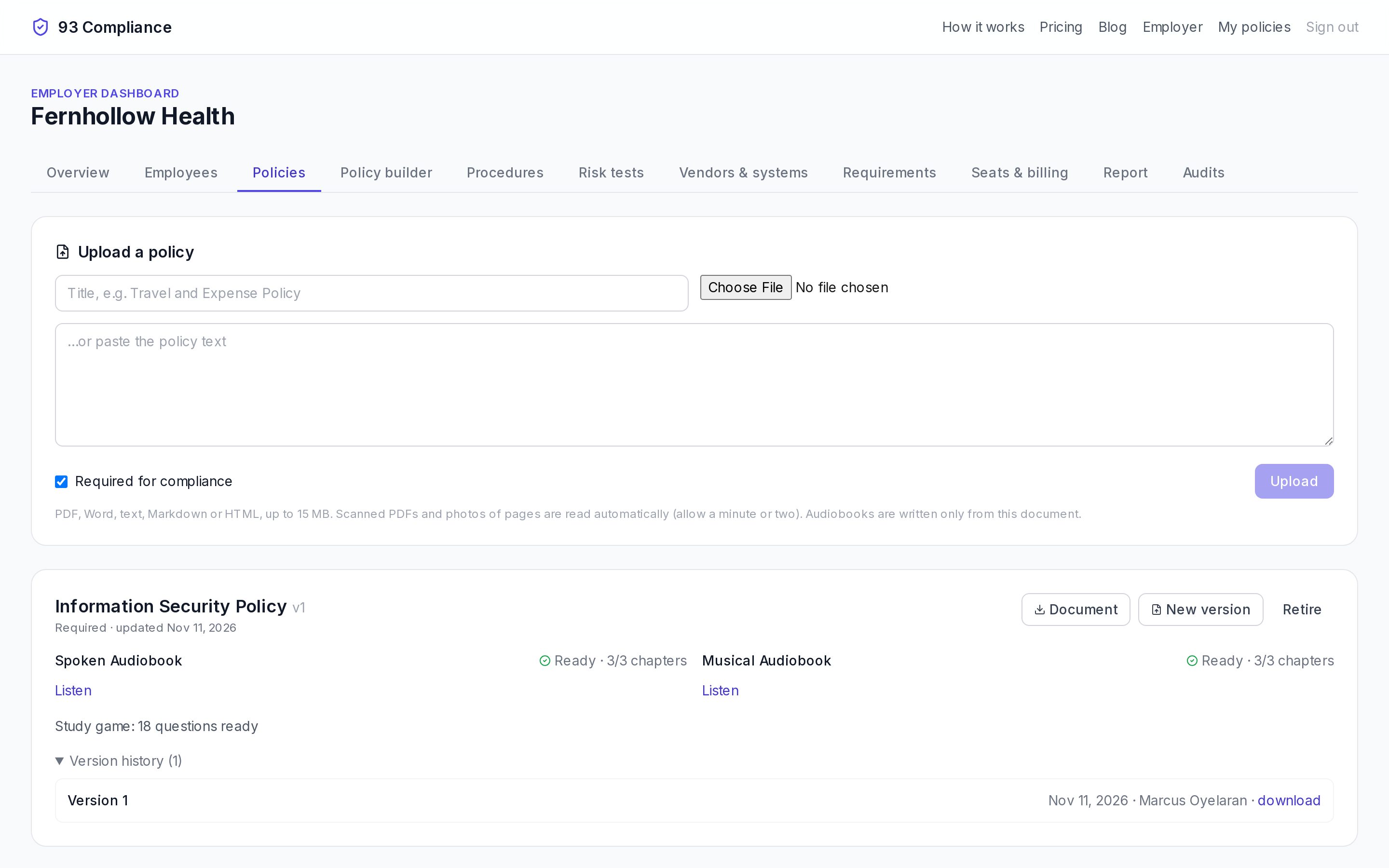
- 1Upload a policy you already have (or publish one from the builder)
- 2Each version gets a spoken and a musical audiobook, written only from the document
- 3New version: employees are asked to complete the changed policy again
- 4Study-game questions come from the same document
Screens show Fernhollow Health, a made-up company we use for demos.
Blanks like [COMPANY_NAME] are highlighted in the builder. Publish stays off until they’re filled in.
You can also skip the builder: Upload a policy you already have on the Policies tab, or choose New version on a policy’s card to upload a changed copy.
Related
More in Concepts
- Policies, drafts and versions
- Requirements and frameworks
- Risk tests
- Controls and the control matrix
- Procedures, runs, steps and evidence
- Training: listening, acknowledging, study games
- Vendors and systems
- Customer security questionnaires
- Discovery: your website and how you work
- “How we really do it” reports