93 Compliance help Concepts
Customer security questionnaires
Answer a customer’s questionnaire from your own policies, then test your policies against it.
A questionnaire can be used two ways, and most companies do both:
- 1Answer it. In the policy builder, under Step 1 (optional): Discovery, upload it (Excel, CSV, PDF or Word). Each question becomes Open, Answered, Needs you or N/A. Work through it with the assistant answers from your policies and asks you what it can’t know. Download filled in writes the answers back into the original spreadsheet.
- 2Test against it. On Risk tests, Import it as requirements, then Run test: every question is checked against your policies, so you see which answers your documents really support.
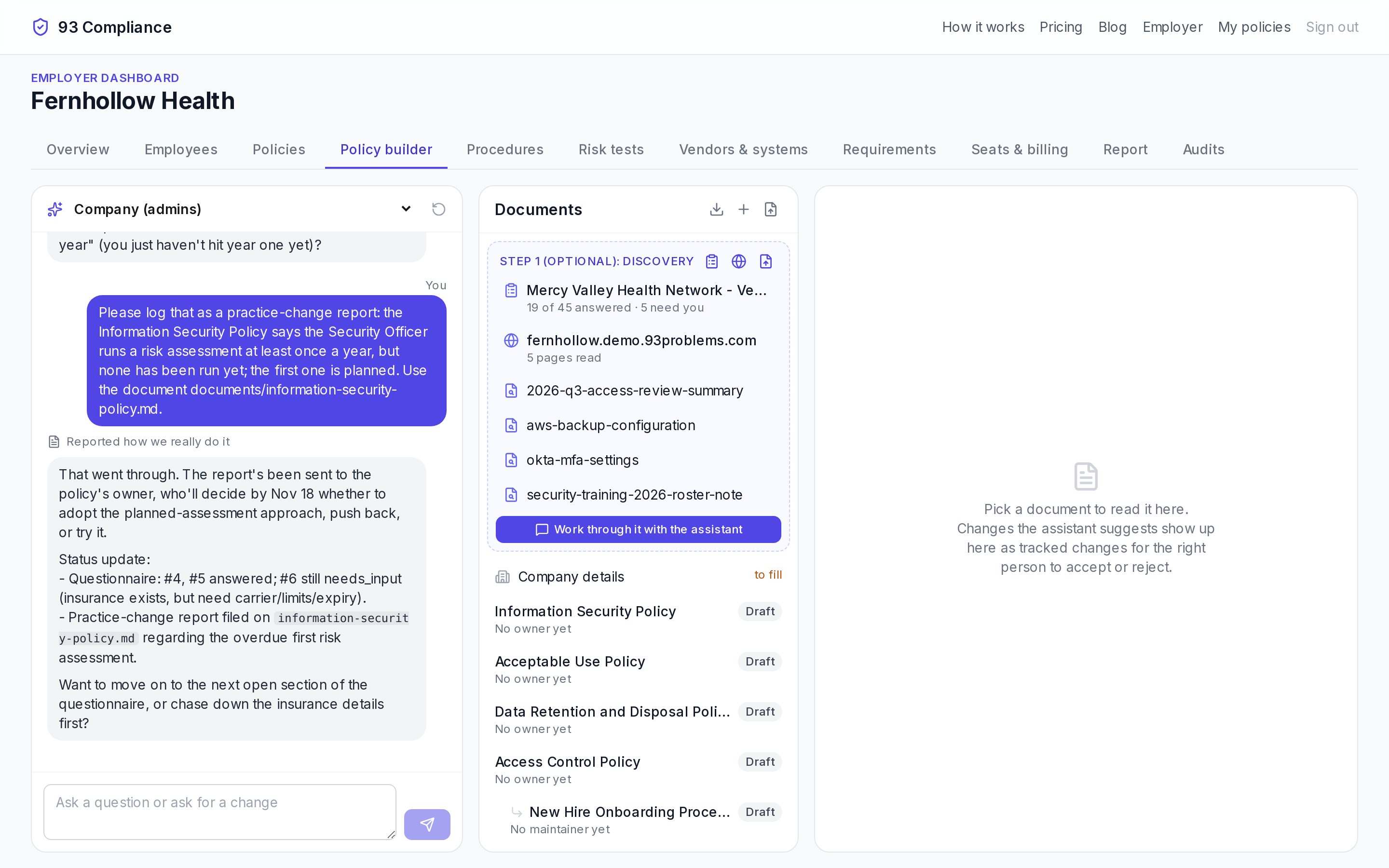
- 1Assistant chat: ask a question or ask for a change. Threads can be private, for admins, or shared on one policy.
- 2Discovery: questionnaires, your website and evidence the assistant reads first
- 3Documents with their status (Draft, Approved, Published)
- 4The focused document; suggested changes appear here as tracked changes to accept or reject
Screens show Fernhollow Health, a made-up company we use for demos.
See one answered: an example questionnaire.
Related
The policy builder
Three panes: the assistant, your documents, and the document you’re working on with tracked changes.
Risk tests
Check every risk and requirement against your documents, the way an auditor would, and fix what’s missing.
Discovery: your website and how you work
Give the assistant your website and real documents first, so policies describe what you actually do.
More in Concepts
- Policies, drafts and versions
- Requirements and frameworks
- Risk tests
- Controls and the control matrix
- Procedures, runs, steps and evidence
- Training: listening, acknowledging, study games
- Vendors and systems
- Customer security questionnaires
- Discovery: your website and how you work
- “How we really do it” reports