Risk tests
Check every risk and requirement against your documents, the way an auditor would, and fix what’s missing.
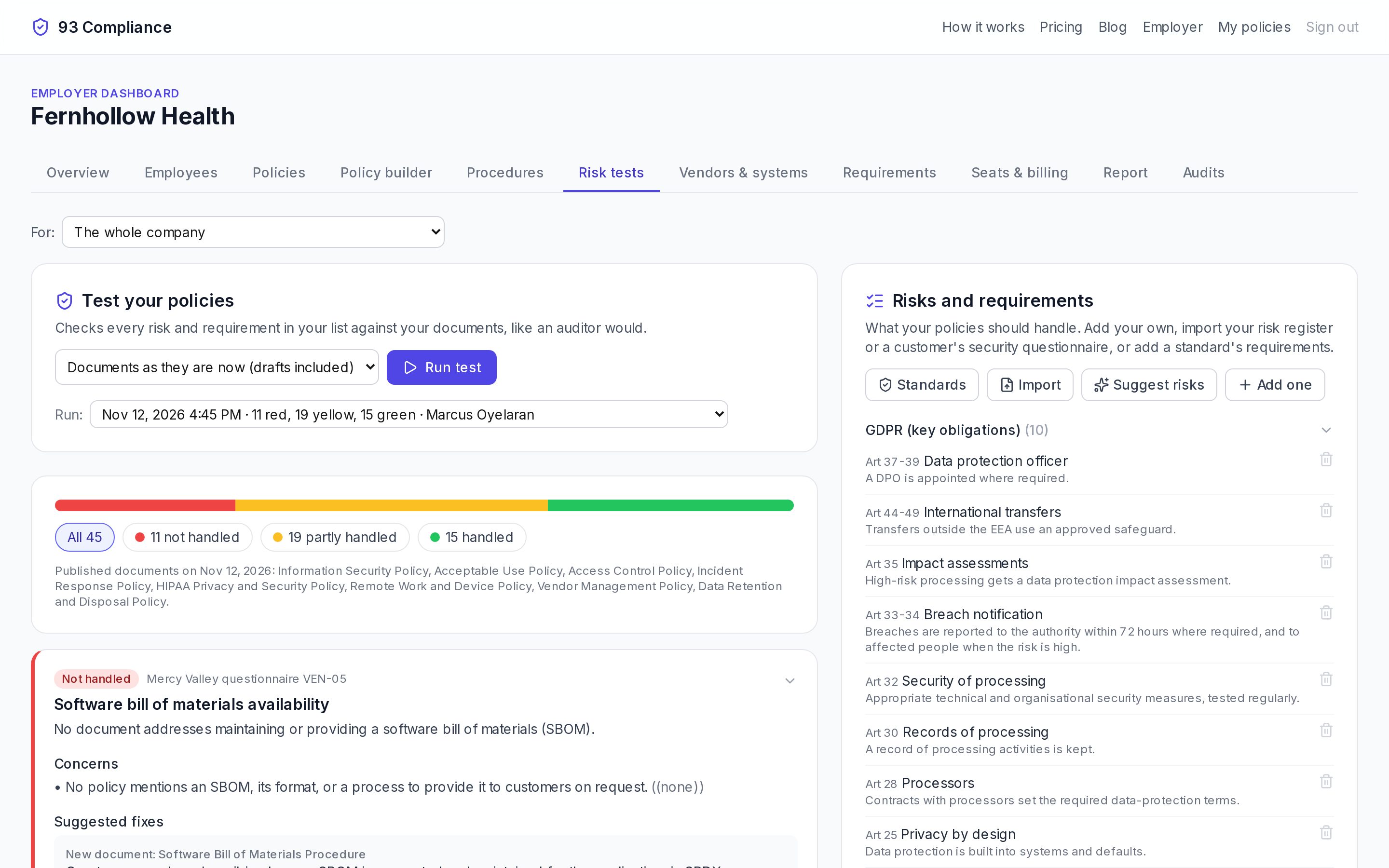
- 1Run test checks every item against your documents
- 2Earlier runs stay on record
- 3Each item is Handled, Partly handled or Not handled
- 4Add items from Standards, Import a register or a customer questionnaire, or Suggest risks
Screens show Fernhollow Health, a made-up company we use for demos.
Run test reads your documents and marks each item green, yellow or red: Handled, Partly handled or Not handled, with the concerns, what’s already in place, and suggested fixes.
Choose what to test: Documents as they are now (drafts included), to see if your changes fix things, or Only what employees have (published), to see where you stand today.
On a suggested fix, Ask the AI to make this change writes it into the policy as a tracked change; Review the change opens it in the builder for a person to accept or reject.
Every run stays on record with its date and who ran it, so you can show an auditor the gaps you found and when you closed them.
Related
More in Concepts
- Policies, drafts and versions
- Requirements and frameworks
- Risk tests
- Controls and the control matrix
- Procedures, runs, steps and evidence
- Training: listening, acknowledging, study games
- Vendors and systems
- Customer security questionnaires
- Discovery: your website and how you work
- “How we really do it” reports