How procedures start: a button, a schedule, or another system
Choose how each procedure starts, what it asks at the start, and let your HR or IT system start runs by itself.
A procedure only helps if it starts when the event happens: someone resigns, a laptop is lost, a quarter begins. In the procedure’s Steps editor, under Trigger, you say what the event is and how a run starts.
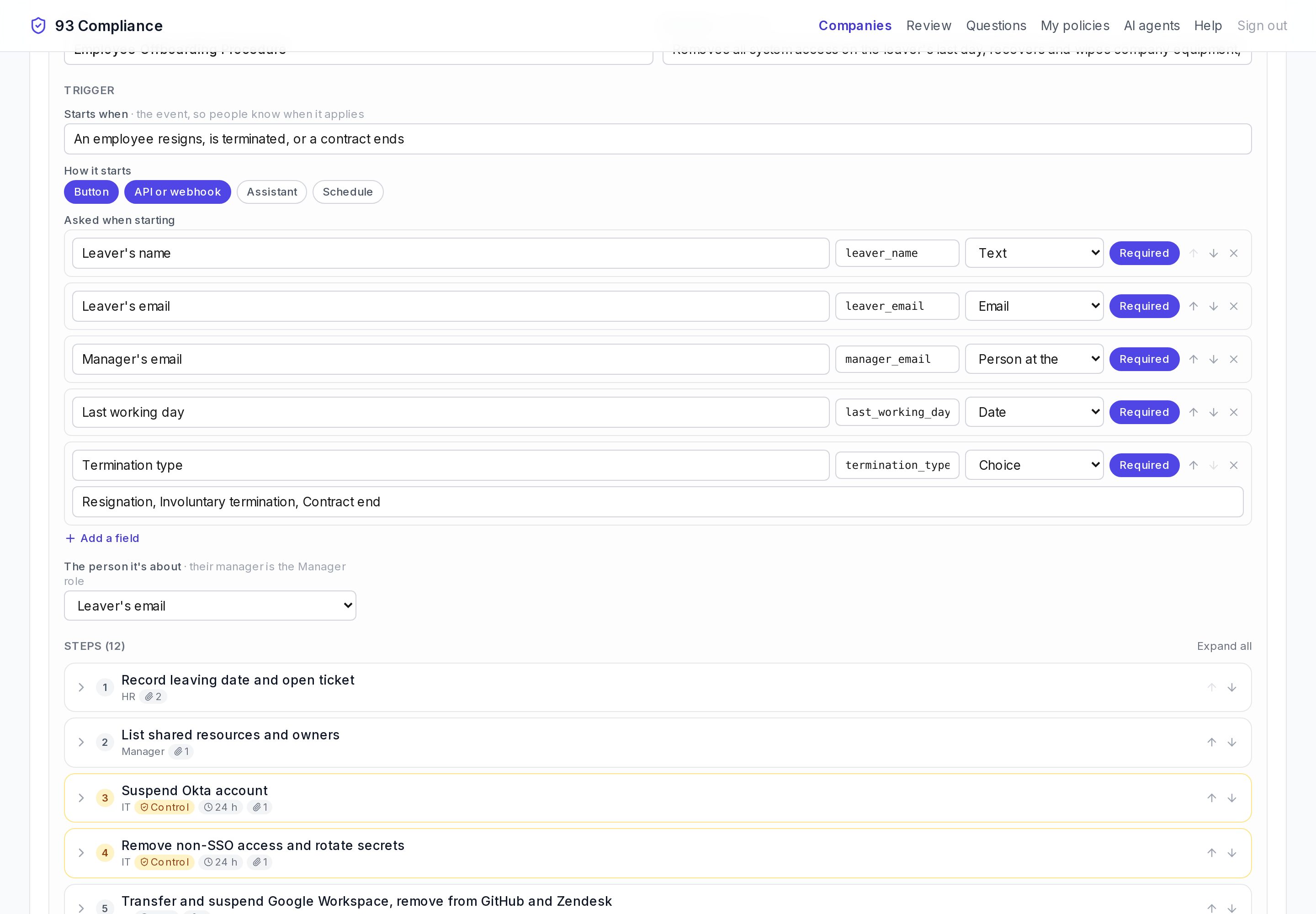
- 1How it starts: a button, another system, the assistant, or a schedule
- 2Asked when starting: the details each run needs
Fernhollow’s offboarding starts from a button or another system, and asks five things at the start.
How it starts
- Button: people allowed to start it see it under Start a procedure on My policies; administrators use Start on Procedures.
- API or webhook: another system starts it (see below).
- Assistant: the assistant or a connected AI agent starts it, after the person confirms.
- Schedule: under Runs on its own, write when, such as
weekdays 08:30,monthly last Friday 16:00orquarterly first Monday 09:00. Times are in the company’s time zone.
Asked when starting
List what every run needs to know: the leaver’s name, their last day, a choice of reasons. Each field is text, a number, yes/no, a choice, a date, an email, or a person at the company, and can be Required. The person it’s about picks one of them; that person’s manager becomes the Manager role for the run.
Let another system start runs
- 1On Procedures, under Start runs from your other systems, name a key (for example “BambooHR”) and choose Make a key. Copy it now; it isn’t shown again. Keys last a year.
- 2Make sure the procedure has API or webhook ticked and is switched On.
- 3Your system sends
POST https://93problems.com/api/v1/procedures/{id}/runswithAuthorization: Bearer <key>and a JSON body. Fields are matched by name, even inside a webhook’s own JSON.
Everything the system sent is kept with the run and shown to the people doing the steps, with a link back to the source. Send an Idempotency-Key header so a repeated webhook doesn’t start a second run.
Scheduled runs are also evidence items: if a scheduled run stops happening, its owners hear about it.