Your Trust Center: one page that shows buyers what you really do
A public page at 93problems.com/trust/your-name, built from your own records: policies, tests, evidence, subprocessors and uptime. Never “compliant”.
Buyers want to see your security before they send their questionnaire. A Trust Center is a page you can link from your website and your emails. Everything on it comes from what 93 Compliance already holds: your published policies, requirement test results, evidence watch, the vendor register, monitoring and service levels, and 93 Notary receipts. Nothing is typed in as a claim.
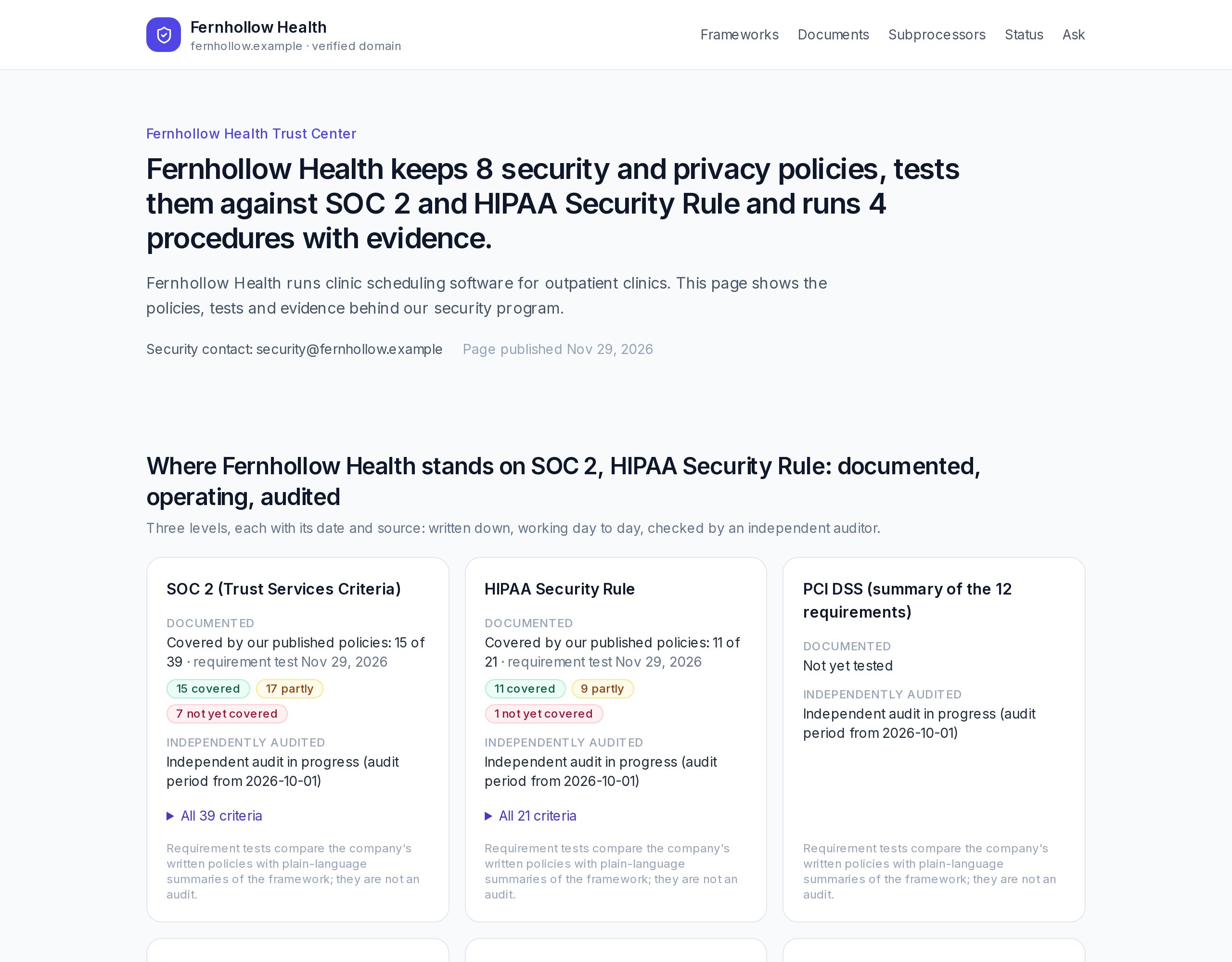
- 1Documented: how much of SOC 2 the published policies cover, with the test date
- 2Red items always show next to the green ones
- 3Audited only with a real report; here, an audit period has started
Screens show Fernhollow Health, a made-up company we use for demos.
What a visitor sees
- Overview: a sentence made from your data (“keeps 8 security and privacy policies, tests them against … and runs 4 procedures with evidence”), your own short text and your security contact.
- Frameworks and where you stand, in three honest levels (below).
- Policies and documents, each with its version, date and access: Public, NDA or On request.
- Subprocessors from your vendor register, Status and service levels from Monitoring, a Security FAQ, Ask (AI answers from your documents) and Notarized records.
Honest status levels
The page never says “compliant” or “certified”. For each framework it says what can be checked, with its date:
- Documented: “Covered by our published policies: 38 of 39”, from your latest requirement test of published policies. The red and yellow counts always show with the green. A test over 120 days old shows its age; after a year it reads “Not recently tested”.
- Operating: “Evidence on time: 17 of 19 recurring controls, last 90 days”, from evidence watch.
- Audited: only when you add the report itself with its type, period and auditor (“SOC 2 Type II report, period … , <auditor>”), or a certificate with its number, issuer and expiry. Otherwise “No independent audit yet”, or “Independent audit in progress” while an auditor has access.
Free text you write (the overview, FAQ answers, document descriptions) is checked too: words like “compliant”, “certified”, “guaranteed” or “bank-grade” are refused with a suggestion of what to say instead.
Every published version is a snapshot, fingerprinted and added to the 93 Notary log. The page’s Verify link shows the fingerprint and the receipt, so a buyer can later prove what your page said on a given day. The receipt proves when the content existed and that it hasn’t changed; it doesn’t prove it’s correct. 93 Compliance is not an auditor.
Free or paid
- Free for every company: the public page, public documents, subprocessors, status, FAQ and notarized records.
- With a paid 93 Compliance plan: documents behind an NDA or approval, watermarked downloads, access requests and Ask (AI answers). Without one, gated documents show as On request with your security contact.
- Full policies are behind an NDA by default; their titles and summaries are public.