Vendor risk: send the questionnaire, save to the register, re-check later
Send the vendor its questions without your reviewer notes, keep the full review for yourself, and see what changed next time.
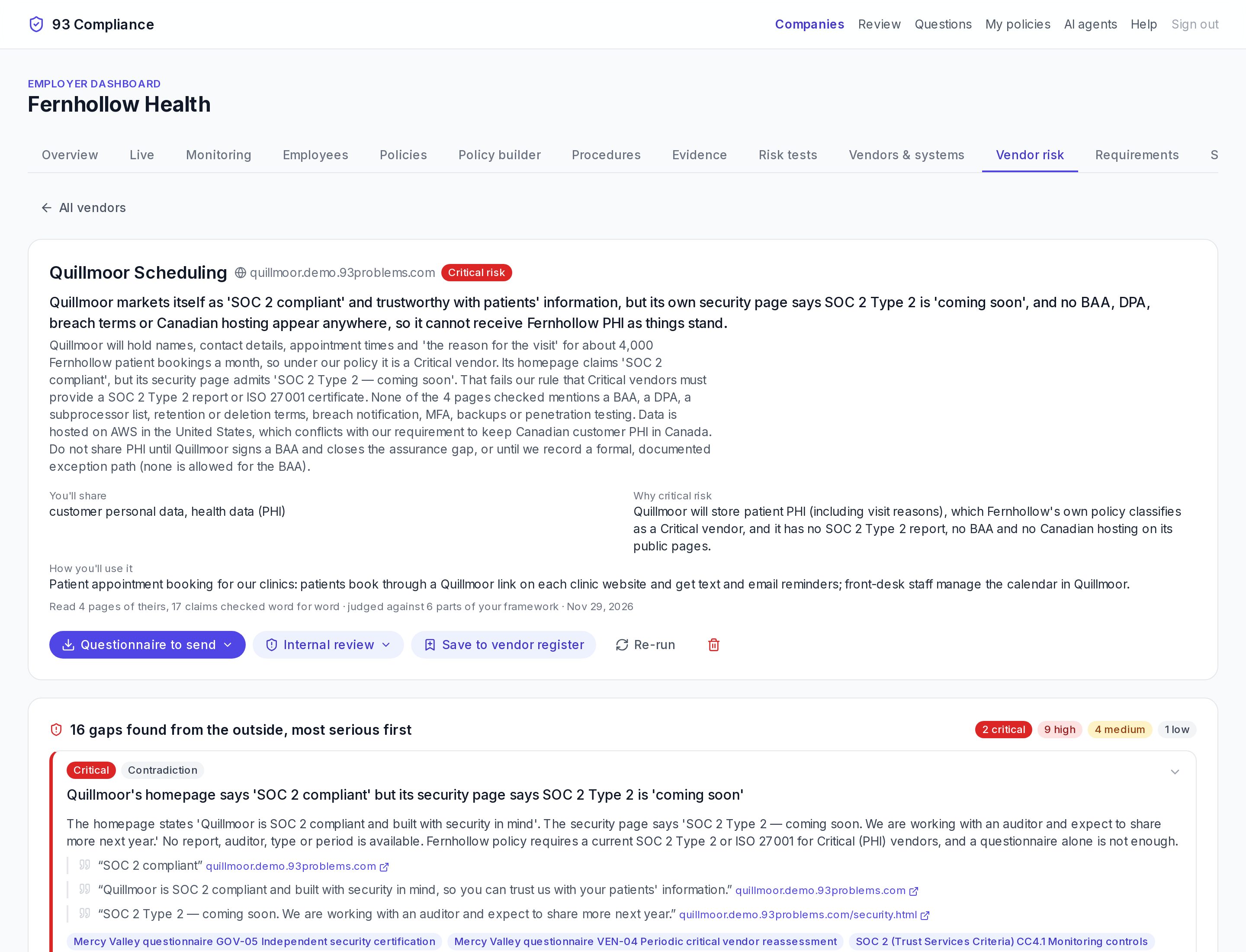
- 1The risk tier, with the reason
- 2Questionnaire to send: questions only
- 3Internal review: findings, good answers, red flags
- 4Link it to the vendor register
- 5Findings, most serious first
Screens show Fernhollow Health, a made-up company we use for demos.
Two copies: one to send, one to keep
- Questionnaire to send: Excel with answer and evidence columns, or Word. It has your company name, a short introduction, and for each question *why we ask* and *what to attach*. It leaves out the good answers, red flags and findings, so the vendor sees only the questions.
- Internal review: a Word report with the findings first (severity, their quoted words, what was checked), the questions with good answers and red flags, and the pages read; or the same questions with reviewer notes in Excel; or everything as CSV.
The vendor’s answers come back in the Excel file’s answer columns. Read them against the A good answer and Red flag columns of your internal copy.
Save it to the vendor register
Save to vendor register links the assessment to an existing vendor in Vendors and systems, or adds the vendor as a new row with what it does, the data shared, a criticality from the tier and a note with the verdict. Mark reviewed today sets the row’s last review date, which is what an auditor checks. Earlier versions of the same vendor are linked too.
Re-run and see what changed
Re-run makes a new version with the same inputs (the list shows v2, v3…). What changed compares it with the version before: new findings, findings no longer found, severity changes, claims added to or gone from their site, and new questions. Run it again before a renewal, or when the vendor says they’ve fixed something.
Limits
- Public information only. It sees what anyone can see; it can’t log in, read a report behind their NDA, or know what isn’t written down.
- Sites built in the browser (JavaScript-only pages) may show little or no text; the assessment then fails with a clear message, or finds less.
- A starting point, not a verdict. Findings are leads for your questionnaire and your judgement. “Not found” means not found on the pages read, not that the vendor doesn’t do it.
- Up to 20 assessments a day per company. One costs us roughly a dollar of AI time; there’s no extra charge to you today.
- Administrators only.
What we send to AI
The vendor’s public pages and the web snippets found about them, the way you said you’ll use the vendor and what you’ll share, your risk register and requirement titles, and an excerpt of your vendor management policy if you have one. Nothing about your employees, your evidence or your documents’ other content. It uses the same AI provider as the rest of 93 Compliance, under the same terms.