Send a job: push it to one driver, or offer it to the nearest and let them Accept if…
Make a job, ride or package; push it, offer it in rings or to chosen drivers; approve “Accept if…” answers; reassign or cancel.
Make a job
Open New job (in a crew, New ride). Choose a job at an address, a ride (pickup A, dropoff B) or a package (see Rides and packages).
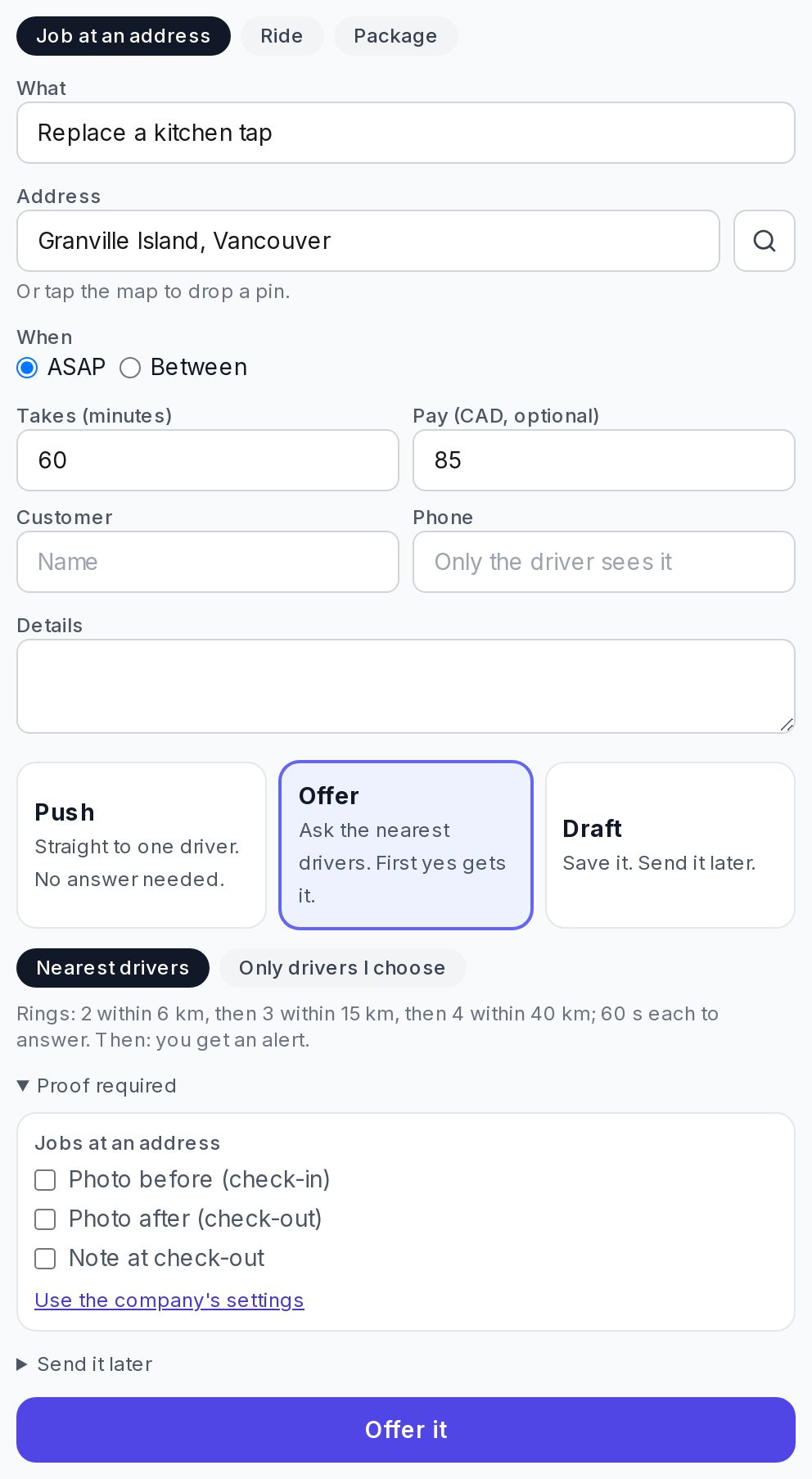
- 1A job at one address, a ride (A to B) or a package
- 2Type an address, or tap the map to drop a pin
- 3The customer’s phone: only the driver who gets the job sees it
- 4Push to one driver, Offer to the nearest, or save a Draft
- 5How the offer goes out: rings of nearest drivers, seconds to answer, what happens next
- 6Proof required for this job only
- 7Send it later: schedule the push or offer
- Where: type an address and press Enter or the search button, or tap the map to drop a pin (its address is found for you). If an address could mean several places, you choose one.
- When: ASAP, or Between two times.
- Takes, Pay (optional; shown to drivers in the offer), Customer and Phone: only the driver who gets the job sees the customer’s phone.
- Details, and a Region if you use them.
- Proof required: what this job needs, if it differs from your settings.
Push, offer or draft
- Push: straight to one driver, no answer needed. The driver’s phone rings, and they can tap Got it so you know they’ve seen it.
- Offer to the Nearest drivers: the job goes out in rings (see below). The first yes gets it.
- Offer to Only drivers I choose: tick up to 100 people; one round, and the first yes wins. If nobody takes it, you get an alert.
- Draft: save it and send it later from the job.
- Send it later: schedule the push or offer for a time.
Round 1 goes to the nearest few online drivers within a short distance, by driving time when it can be worked out. Each has the same seconds to answer. If everyone declines or the time runs out, the next ring goes wider. After the last ring, the job is pushed to the nearest free driver or marked Nobody took it with an alert, as your settings say. Only drivers who are online and have agreed to location sharing are asked.
Answers
Open a job to see every answer as it comes in: Accepted, Declined with the reason (too far, busy, off shift, price too low, time doesn’t work, other, plus their words), Accept if…, Too late, No answer or Withdrawn, with the distance, the phone used and when.
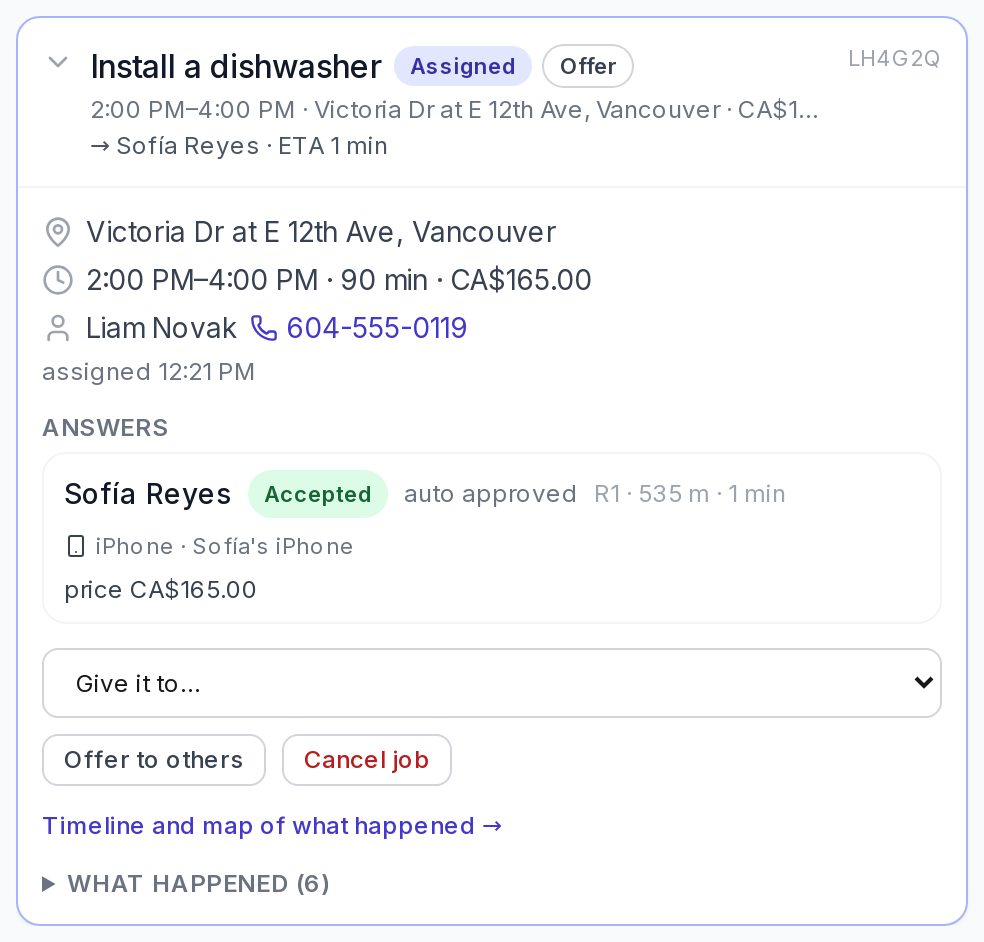
Sofía asked for CA$165 instead of CA$150. That’s within + 15 %, so it was approved at once and the job is hers.
Approving “Accept if…”
When a driver’s terms are outside your rules (or they wrote a note), the job shows under Waiting for your answer at the top of the Jobs list, with the badge on Jobs, and office staff get a notification. Approve gives them the job on those terms; Decline tells them no. The offer is held for that driver until you answer or the round ends, but a plain Accept from someone else still wins meanwhile.
Change your mind
- Offer now or Offer to… a draft, scheduled job or one nobody took.
- Push to… a driver, or Give it to… someone else once it’s assigned; Offer to others offers it again without the current driver. The previous driver is told.
- Cancel job with an optional reason (drafts and scheduled jobs can be Deleted). The driver and anyone holding an offer are told; for a ride, so is the rider.
- Editing a job’s details tells the assigned driver.
Related
More in 93 Dispatch
- 93 Dispatch: send jobs to your drivers’ phones and watch them get done
- Set up 93 Dispatch: turn it on, invite drivers, choose your rules
- Send a job: push it to one driver, or offer it to the nearest and let them Accept if…
- The live board: who is online, where every job stands, and the proof
- Rides and packages: riders ask through a link, parcels carry a tracking link
- For drivers: go online in the app, answer offers, and work each job step by step
- Dispatch and your location: shared only while you’re online, kept only with the job