Set up 93 Dispatch: turn it on, invite drivers, choose your rules
Turn Dispatch on for your company or start a crew, invite drivers and dispatchers, and set how offers, approvals and proof work.
93 Dispatch is switched on for a business on request. Ask us if you’d like to use it; until then the Dispatch tab doesn’t appear. Ask about pricing at the same time: Dispatch has no price of its own on the site yet.
Turn it on for your company
- 1Once Dispatch is switched on for your account, your company dashboard has a Dispatch tab.
- 2Open it and choose Turn on Dispatch for this company (owner or administrator).
- 3The board opens. Dispatch also appears in the top menu, listing every company and crew you’re in.
Or start a crew
On Dispatch in the top menu, Start a crew: type a name (e.g. “Vic’s Taxi crew”) and choose Start. You’re the crew’s owner; its board opens at once.
Invite drivers and dispatchers
- 1On the board, open Team and choose Invite people (in a crew, Invite a driver).
- 2Type one person per line:
email, name. Choose the role: Driver, Dispatcher or Admin (only the owner can add administrators), and a region if you use them. - 3Send invitations. Each person gets an email; you can also show them the code on screen. Invitations are open for 7 days.
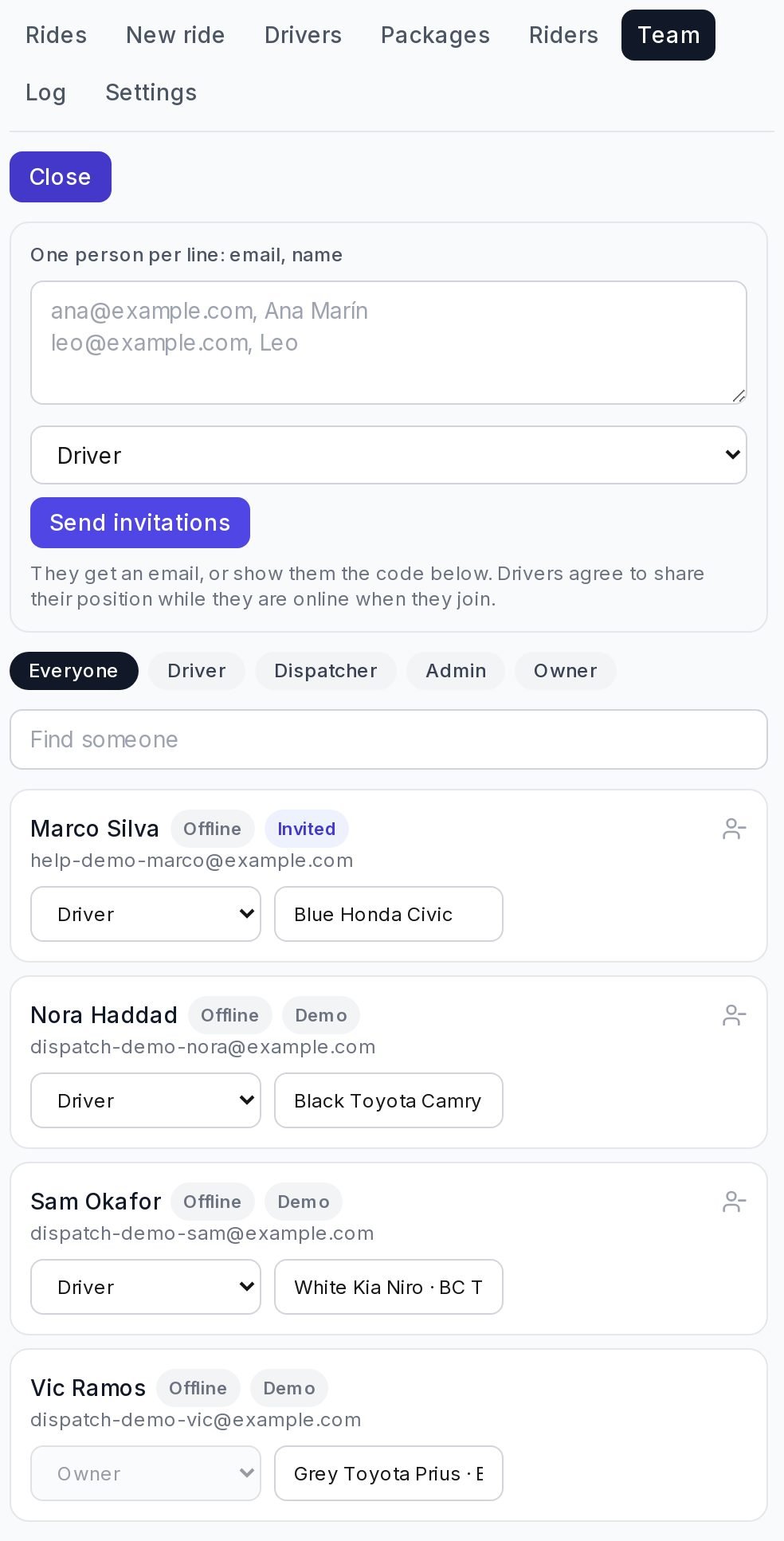
- 1Invited, not joined yet
- 2Invite several people at once: email, name
- 3They agree to location sharing when they join
An invitation waits as Invited until the person accepts.
The invitation page says plainly what the business will see, and asks the driver to agree to share their position while they are online. They can also agree later, in the app, the first time they go online. Someone already in your company just gets the dispatch role.
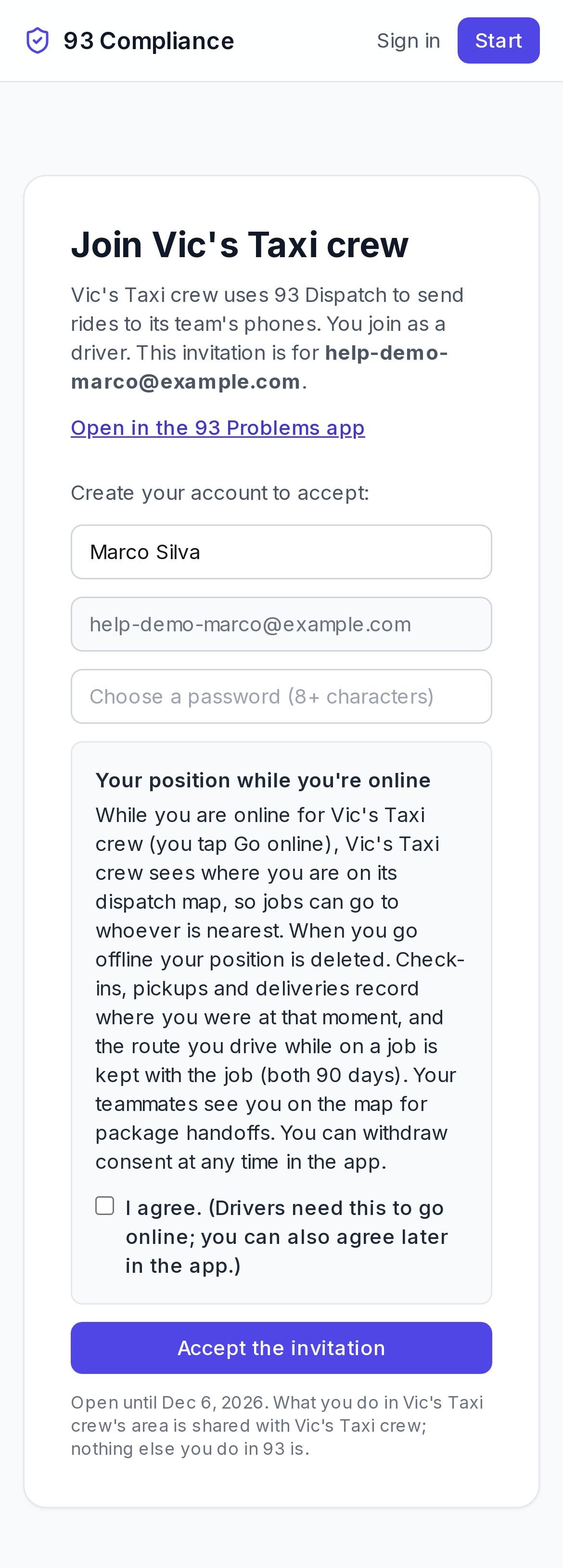
The invitation a driver sees (made-up names).
In Team you can change someone’s role, region and vehicle, or remove them: they go offline and any open offers to them are withdrawn. The owner can’t be removed.
Choose your rules (Settings)
Owners and administrators see Settings:
- Offers: drivers per ring, ring radius, seconds to answer and how many rings. Out of the box: 3 drivers within 5 km, then 5 within 15 km, then 10 within 50 km; 60 seconds each; 3 rings.
- When nobody takes it: Alert the office (the job is marked “Nobody took it”), or Push to the nearest free driver.
- “Accept if…” answers approved without asking: a price up to + 15 % and a time within ± 30 minutes, out of the box. 0 means always ask. A note always needs you.
- Tracking: the late alert (5 minutes after the window ends, out of the box), when a silent phone counts as offline (15 minutes), time zone, currency, ETAs by road, and the home base the map and address search start from.
- Proof required: what drivers must add at each step, for every job (a single job can change it). “Away” marks a step done more than 150 m from the place.
- Ride requests (crews): off, invite only, or a public page, with its title, message and service area.
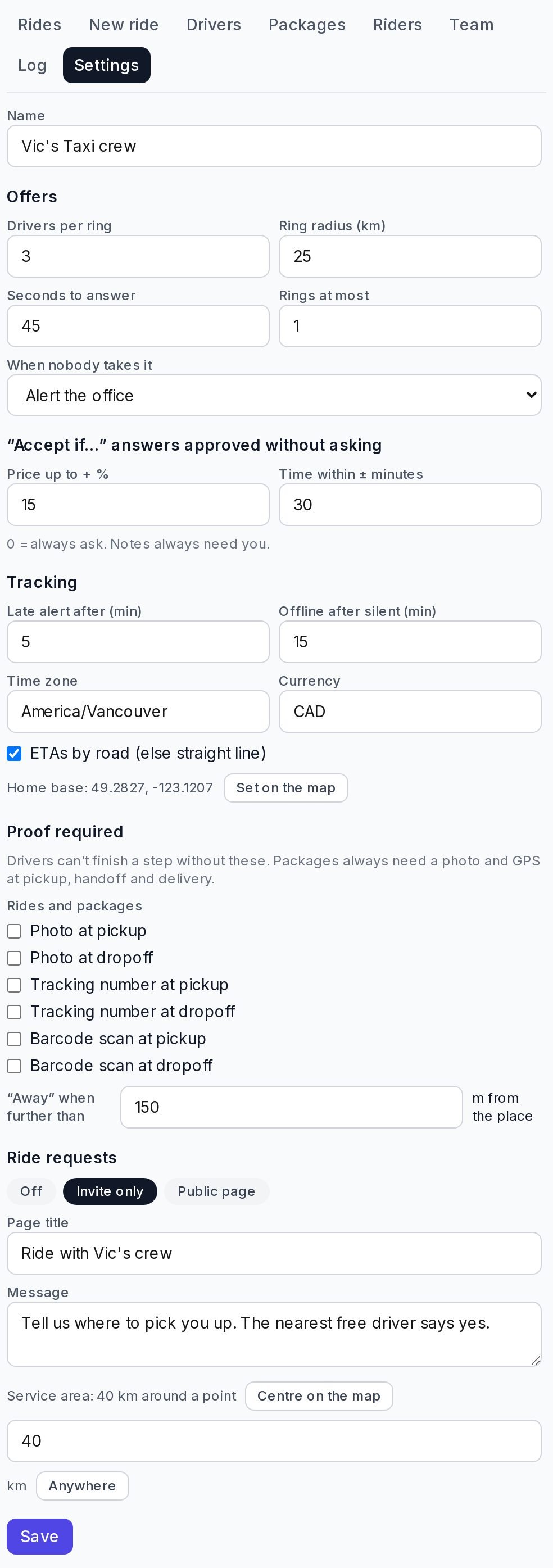
- 1Offers: drivers per ring, ring radius, seconds to answer, how many rings
- 2When nobody takes it: alert the office, or push to the nearest free driver
- 3Accept if… answers approved without asking, within these limits
- 4Late alerts and when a silent phone counts as offline
- 5Proof required for every job, ride and package
- 6Crews: who can ask for a ride
A crew’s settings. A company has the same, without ride requests.
Regions and recurring jobs (companies)
- Regions: draw a circle or tap the corners of an area on the map. A dispatcher given a region sees and sends only that region’s jobs and drivers (plus jobs with no region), and gets only its alerts.
- Recurring: a job that repeats on chosen weekdays at a set time. Each morning (from 5 a.m. your time) the day’s job is made, then pushed, offered or kept as a draft, sent the number of minutes you choose before it starts. Make today’s now makes it at once.
- Yesterday (on the Jobs list) copies yesterday’s jobs to today at the same times, as drafts or sent an hour before each one starts.
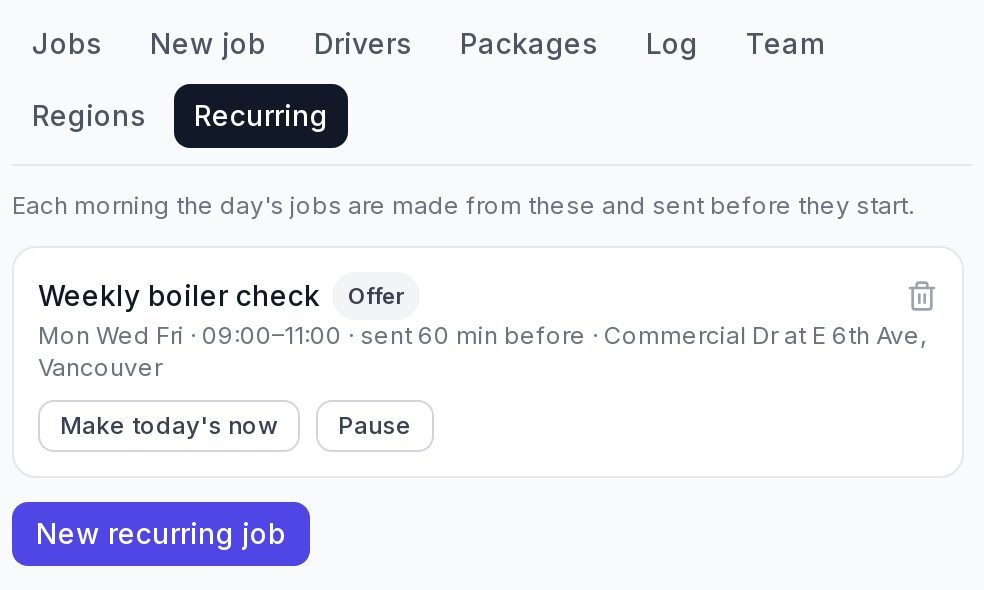
- 1Each morning the day’s jobs are made and sent before they start
- 2A recurring job: weekdays, time, push or offer
- 3Make today’s job now
Related
More in 93 Dispatch
- 93 Dispatch: send jobs to your drivers’ phones and watch them get done
- Set up 93 Dispatch: turn it on, invite drivers, choose your rules
- Send a job: push it to one driver, or offer it to the nearest and let them Accept if…
- The live board: who is online, where every job stands, and the proof
- Rides and packages: riders ask through a link, parcels carry a tracking link
- For drivers: go online in the app, answer offers, and work each job step by step
- Dispatch and your location: shared only while you’re online, kept only with the job